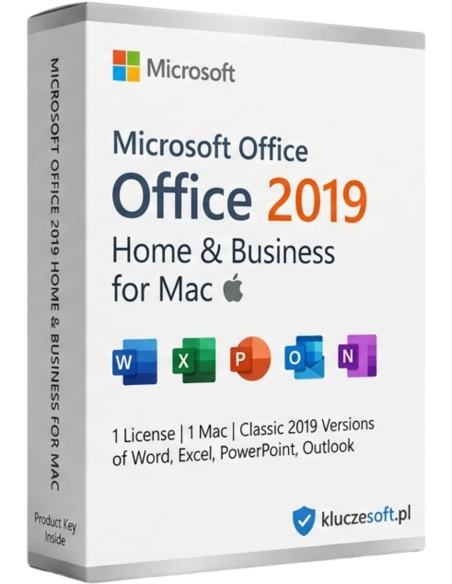



Gebruikers en liefhebbers van Apple Mac-computers kunnen genieten van het nieuwe pakket met favoriete Office-toepassingen voor thuisgebruikers en kleine bedrijven. De volgende versie van het lokaal geïnstalleerde pakket vereist helemaal geen computer met Windows.
Professioneel Office-pakket voor macOS — Word, Excel, PowerPoint en Outlook voor Apple-computers
 Speciaal voor macOS
  Commerciële licentie
  Eeuwigdurende licentie
  Directe levering
Microsoft Office 2019 Home & Business Mac is een speciale versie van het kantoorpakket, ontwikkeld voor macOS. Het bevat vier essentiële toepassingen — Word, Excel, PowerPoint en Outlook — geoptimaliseerd voor de Mac-interface, met volledige ondersteuning voor Retina-displays en de Touch Bar op oudere MacBook Pro-modellen. De commerciële licentie maakt legaal zakelijk gebruik mogelijk. Wanneer u uw Office 2019 Mac licentiesleutel koopt bij Licensier, ontvangt u een originele Microsoft-licentie met eeuwigdurende geldigheid — een eenmalige betaling in plaats van een dure Microsoft 365 for Mac-abonnement.
Grafisch ontwerpers, fotografen en copywriters die op een Mac werken. Maak offertes in Word, analyseer projecten in Excel en presenteer uw portfolio in PowerPoint — zonder over te stappen op Windows.

Kantoren met iMacs en MacBooks. Volledige compatibiliteit met Office-documenten van zakelijke partners die Windows gebruiken. Outlook voor professionele zakelijke e-mail.

Freelancers en thuiswerkers met een MacBook. Een compleet kantoorpakket met Outlook-mail — alles wat u nodig heeft om efficiënt op uw Apple-computer te werken.
Schrijf scripties in Word, analyseer data in Excel en maak presentaties in PowerPoint. Dankzij de commerciële licentie kunt u hetzelfde pakket later ook zakelijk blijven gebruiken.

Native Word-applicatie voor macOS met een interface die perfect aansluit op het Apple-ecosysteem. Ondersteuning voor Retina-displays, trackpadgebaren, de donkere modus van macOS en de Touch Bar. Volledige compatibiliteit met .docx-documenten van Windows-computers.
Geavanceerde spreadsheets met draaitabellen, grafieken en formules — in een native macOS-versie. Importeer en bewerk .xlsx-bestanden zonder opmaakverlies. Ondersteunt Mac-sneltoetsen (Cmd in plaats van Ctrl).
Maak indrukwekkende presentaties op uw Mac met animaties, overgangen en ingebouwde sjablonen. Presenteer in presentatormodus met notitievoorbeeld. Exporteer naar video of PDF. Volledige compatibiliteit met .pptx-bestanden uit Windows.
Beheer e-mail, agenda en contacten in een native macOS-applicatie. Integratie met iCloud, Gmail en Exchange. Gerichte inbox, berichtenfilters en gedeelde agenda's voor efficiënte afspraakplanning.
Applicaties die speciaal voor macOS zijn ontwikkeld — geen Windows-poorten. Ondersteuning voor donkere modus, Multi-Touch-gebaren, Touch Bar, Handoff en Continuity. Een interface die volledig aansluit op de rest van het Apple-systeem.
Open en bewerk .docx-, .xlsx- en .pptx-bestanden die op Windows-computers zijn gemaakt zonder problemen met de opmaak. Werk moeiteloos samen met gebruikers van Office op pc — documenten zien er op beide платформen identiek uit.
️Eenmalige betaling in plaats van een Microsoft 365 for Mac-abonnement. Gebruik het pakket zonder tijdslimiet. Ideaal voor Apple-gebruikers die waarde hechten aan stabiliteit, voorspelbare kosten en een originele licentie.
 ️
️Documentversleuteling, wachtwoordbeveiliging en digitale handtekeningen — dezelfde beveiligingsfuncties als in de Windows-versie. Integratie met de macOS-sleutelhanger (Keychain) voor veilige opslag van inloggegevens.
Eigenaars van Apple-computers staan vaak voor dezelfde keuze: gratis Pages/Numbers/Keynote gebruiken of investeren in Microsoft Office. Het antwoord is eenvoudig — als u samenwerkt met bedrijven en klanten die Windows gebruiken, is Microsoft Office voor Mac onmisbaar. .docx-documenten die in Pages worden geopend, verliezen vaak hun opmaak, en .xlsx-bestanden in Numbers ondersteunen geavanceerde formules en draaitabellen niet volledig.
Office 2019 Home & Business Mac van Licensier is een native macOS-versie — geen emulatie en geen Windows-port. De applicaties zijn geoptimaliseerd voor de Mac-interface, ondersteunen Retina-displays, trackpadgebaren en donkere modus. Tegelijkertijd behouden ze 100% compatibiliteit met documenten die op Windows zijn gemaakt — uw bestanden zien er op beide platforms exact hetzelfde uit.
Wanneer u bij Licensier koopt, bespaart u aanzienlijk ten opzichte van een Microsoft 365 for Mac-abonnement (ca. €70/jaar). Een eeuwigdurende licentie betekent een eenmalige betaling en geen terugkerende kosten. Uw activeringssleutel wordt met directe levering per e-mail verstuurd, en ons supportteam helpt u met installatie en activatie op uw Mac. Uiteraard ontvangt u een factuur incl. BTW.
| Applicaties | Word, Excel, PowerPoint, Outlook (Mac-versie) |
| Type licentie | Eeuwigdurend (eenmalige betaling, zonder abonnement) |
| Commercieel gebruik | Ja — de licentie is geldig voor zakelijk gebruik |
| Aantal apparaten | 1 Mac-computer |
| Platform | macOS (speciaal ontwikkeld voor Apple) |
| Compatibiliteit met macOS | macOS 10.15 Catalina en nieuwer |
| Processors | Intel en Apple Silicon (M1/M2/M3/M4) via Rosetta 2 |
| Microsoft-account | Vereist voor activatie |
| Internet | Vereist voor activatie en download |
| Schijfruimte | Min. 10 GB vrije ruimte |
| RAM | Min. 4 GB |
| Retina | Volledige ondersteuning voor Retina-displays |
| Taal | Meertalig (waaronder Pools) |
Office 2019 Home & Business Mac is een bewezen versie met Word, Excel, PowerPoint en Outlook met een eeuwigdurende licentie — ideaal voor gebruikers die stabiliteit waarderen en niet per se de nieuwste functies nodig hebben. Office 2021 Home & Business Mac is een nieuwere editie met enkele extra functies (zoals XLOOKUP in Excel) en langere ondersteuning — interessant als het prijsverschil beperkt is. Microsoft 365 for Mac is een abonnement (ca. €70/jaar) met doorlopende updates en 1 TB OneDrive-cloudopslag — vooral zinvol als u altijd de nieuwste functies en cloudopslag nodig heeft. Voor de meeste Mac-gebruikers biedt Office 2019 de beste prijs-kwaliteitverhouding.
U ontvangt uw productsleutel binnen enkele minuten nadat uw bestelling is betaald
Ja, Office 2019 for Mac werkt op Apple-computers met Apple Silicon-processors (M1, M2, M3 en M4) via de compatibiliteitslaag Rosetta 2. De applicaties starten op en werken soepel, al profiteren ze niet van native ARM-optimalisatie zoals nieuwere Office-versies. Voor dagelijks kantoorgebruik is het prestatieverschil in de praktijk nauwelijks merkbaar.
Nee, Office 2019 Home & Business Mac is een licentie die uitsluitend bedoeld is voor macOS. U kunt deze niet activeren op een Windows-computer. Heeft u Office voor Windows nodig, dan vindt u in ons assortiment geschikte pc-versies, zoals Office 2019 Home & Business (Windows) of Office 2019 Professional.
Ja, volledige compatibiliteit met Windows-documenten is een van de grootste voordelen van Office voor Mac. .docx-, .xlsx- en .pptx-bestanden openen probleemloos met behoud van opmaak, stijlen, formules en draaitabellen. Documenten die op Mac zijn gemaakt, openen ook correct op Windows — samenwerken tussen platforms verloopt zonder problemen.
Ja, Office 2019 for Mac ondersteunt de donkere modus (Dark Mode) die is geïntroduceerd in macOS Mojave. Alle vier de applicaties — Word, Excel, PowerPoint en Outlook — passen hun interface aan op basis van de systeeminstellingen. De donkere modus vermindert vermoeide ogen tijdens avondwerk en ziet er uitstekend uit op Retina-displays.
De gratis Apple-applicaties (Pages, Numbers, Keynote) zijn prima voor eenvoudige taken, maar hebben duidelijke beperkingen in een zakelijke omgeving. Ze ondersteunen geavanceerde Excel-functies niet volledig (draaitabellen, VBA-macro's), bieden geen volledige compatibiliteit met .docx/.xlsx/.pptx-formaten en hebben geen e-mailclient die vergelijkbaar is met Outlook. Werkt u samen met mensen die Windows gebruiken, dan is Microsoft Office de enige oplossing die een identieke documentweergave garandeert.
Eén Office 2019 Home & Business Mac activeringssleutel is bedoeld voor activatie op één Mac-computer. Heeft u meerdere Apple-computers (bijvoorbeeld een iMac op kantoor en een MacBook thuis), dan heeft u voor elk apparaat een aparte licentiesleutel nodig.
OneNote wordt niet standaard geïnstalleerd als onderdeel van Office 2019 Mac, maar is wel gratis beschikbaar in de Mac App Store. Microsoft biedt OneNote for Mac kosteloos aan voor alle macOS-gebruikers, dus u kunt het onafhankelijk van uw aangeschafte Office-pakket installeren.
Office 2019 for Mac ontvangt beveiligingsupdates van Microsoft. Nieuwe functies worden daarentegen niet toegevoegd — die zijn voorbehouden aan Microsoft 365-abonnementen. Beveiligingsupdates worden automatisch geïnstalleerd via Microsoft AutoUpdate, dat standaard bij het pakket is inbegrepen.
Uw activeringssleutel wordt binnen enkele minuten na registratie van de betaling per e-mail verzonden. De volledige levering is digitaal. U kunt Office 2019 nog dezelfde dag op uw Mac downloaden, installeren en activeren. Het installatiebestand downloadt u rechtstreeks vanaf de Microsoft-server nadat u bent ingelogd op office.com/setup.
Ja, Office 2019 Home & Business Mac bevat een commerciële licentie die legaal gebruik binnen uw bedrijf, kantoor, praktijk of andere professionele omgeving toestaat. Dat is een belangrijk verschil met een hypothetische versie "Home & Student", die beperkt is tot privé- en educatief gebruik.
 ️
️
Datasheet
Specifieke referenties
Gebruikers en liefhebbers van Apple Mac-computers kunnen genieten van het nieuwe pakket met favoriete Office-toepassingen voor thuisgebruikers en kleine bedrijven. De volgende versie van het lokaal geïnstalleerde pakket vereist helemaal geen computer met Windows.