- Obecnie brak na stanie
 Dostawa w 1 min
 100% Oryginalne
 TrustedShops 4.81 · 3 783 opinii


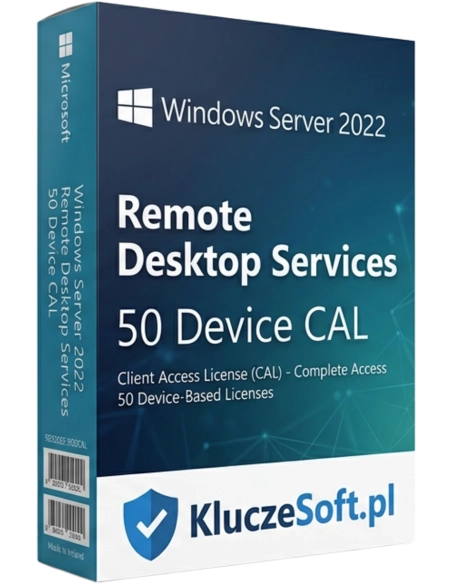
Microsoft Windows Server 2022 RDS (Remote Desktop Services) 50 Device CAL to kluczowy element infrastruktury IT dla przedsiębiorstw pragnących zwiększyć efektywność pracy zdalnej i zapewnić bezpieczny dostęp do zasobów firmowych z dowolnego miejsca. Ta licencja umożliwia podłączenie do 50 urządzeń do serwera Windows Server 2022, oferując elastyczne i skalowalne rozwiązanie dla organizacji każdej wielkości.
Pakiet 50 licencji Remote Desktop Services na urządzenie do Windows Server 2022
 50 RDS Device CAL
  Natychmiastowa dostawa
  Licencja wieczysta Pulpit zdalny
RDS Device CAL to licencja usług pulpitu zdalnego przypisana do konkretnego urządzenia fizycznego. Pozwala dowolnej liczbie użytkowników tego urządzenia na korzystanie z sesji Remote Desktop na Windows Server 2022. Jest to odrębna licencja od standardowej Windows Server CAL — wymagana dodatkowo, gdy użytkownicy łączą się z serwerem przez sesje pulpitu zdalnego (a nie tylko korzystają z zasobów sieciowych). RDS Device CAL jest idealny dla środowisk z thin clientami, kioskami i współdzielonymi terminalami, gdzie wiele osób korzysta z tych samych urządzeń do pracy zdalnej na serwerze.

Bez licencji RDS CAL korzystanie z pulpitu zdalnego (poza 2 sesjami administracyjnymi) jest nielegalne. Pakiet 50 Device CAL legalizuje dostęp RDS dla 50 urządzeń klienckich, eliminując ryzyko kar przy audycie Microsoft.
RDS Device CAL idealnie współgra z infrastrukturą thin clientów. 50 tanich terminali podłączonych do potężnego serwera — pełna funkcjonalność desktopowa przy minimalnych kosztach sprzętu i konserwacji.
W call center z 50 stanowiskami, na których pracuje 150 osób na zmiany, potrzebujesz 50 Device CAL zamiast 150 User CAL. Oszczędność 66% kosztów licencyjnych RDS — znacząca kwota przy cenach licencji RDS.

Każdy thin client lub terminal z przypisanym RDS Device CAL może być używany przez nieograniczoną liczbę pracowników do sesji pulpitu zdalnego. Zmiana, dyżur, zastępstwo — jeden CAL pokrywa wszystkich.
W architekturze RDS wszystkie dane i aplikację są na serwerze. Urządzenia klienckie pełnią rolę terminali wyświetlających — nawet w przypadku kradzieży lub awarii thin clienta dane firmowe pozostają bezpieczne.
Aktualizacje systemu, instalację programów, backupy — wszystko zarządzasz centralnie na serwerze. 50 thin clientów wymaga minimalnej konserwacji, co radykalnie zmniejsza obciążenie zespołu IT.
Licencje RDS CAL to jeden z najdroższych elementów infrastruktury Windows Server — w Licensier oferujemy je w cenach hurtowych, nawet 50% poniżej cen katalogowych. Nasz zespół pomoże zaplanować kompletne licencjonowanie: Windows Server + Windows Server CAL + RDS CAL, aby nic nie zostało pominięte. Każde zamówienie jest realizowane elektronicznie z fakturą VAT. Dla dużych zamówień (100+ CAL) oferujemy dodatkowe rabaty — skontaktuj się z nami.
| Produkt | Windows Server 2022 Remote Desktop Services — 50 Device CAL |
| Typ licencji | RDS Device CAL (licencja usług pulpitu zdalnego na urządzenie) |
| Liczba licencji w pakiecie | 50 RDS Device CAL |
| Wersja Windows Server | Windows Server 2022 |
| Przypisanie | Do konkretnego urządzenia (dowolna liczba użytkowników) |
| Wymagania dodatkowe | Windows Server CAL (osobno) + licencja Windows Server 2022 |
| Licencja | Wieczysta (bezterminowa) |
| Wsparcie Microsoft | Mainstream do 2026, Extended do 2031 |
| Protokół | RDP (Remote Desktop Protocol) |
| Język | Wszystkie wersję językowe |
| Forma dostawy | Elektroniczna — klucz licencyjny e-mail |
RDS Device CAL jest przypisany do urządzenia (thin client, terminal, komputer). Dowolna liczba pracowników może korzystać z tego urządzenia do sesji pulpitu zdalnego. Najlepszy dla: call center (150 agentów na 50 stanowiskach), szpitali (personel dyżurowy), fabryk (terminale na hali), szkoleń (sale komputerowe). RDS User CAL jest przypisany do pracownika — łączy się z dowolnego urządzenia. Lepszy dla: biur z polityką BYOD, pracowników zdalnych łączących się z domu i z biura. Kluczowa zasada: jeśli masz więcej ludzi niż urządzeń — Device CAL jest tańszy. Jeśli więcej urządzeń niż ludzi — User CAL.
Ekspresowa dostawa elektronicznaKlucz licencyjny otrzymasz na e-mail w ciągu kilku minut od złożenia zamówienia
Nie! To dwa różne produkty. Windows Server CAL uprawnia urządzenie do korzystania z usług serwera (pliki, drukowanie, Active Directory). RDS CAL jest DODATKOWĄ licencją wymaganą do korzystania z sesji pulpitu zdalnego. Potrzebujesz obu typów dla każdego urządzenia łączącego się przez RDS.
Tak, każde urządzenie łączące się z sesją Remote Desktop Services — thin client, komputer, tablet, zero client — musi posiadać licencję RDS Device CAL (lub użytkownik musi mieć RDS User CAL). Thin clienty nie są zwolnione z tego wymogu.
Licencje RDS CAL nie ograniczają liczby jednoczesnych sesji — to zależy od wydajności serwera (RAM, CPU). 50 Device CAL pozwala na 50 urządzeń, ale jednocześnie sesje aktywne może mieć tyle, ile serwer jest w stanie obsłużyć.
Tak, po 90 dniach od ostatniego przypisania. W przypadku awarii urządzenia — natychmiast. Serwer licencji RDS automatycznie zarządza przypisaniem, ale warto prowadzić własny rejestr na potrzeby audytu.
Tak, licencję RDS CAL 2022 uprawniają do korzystania z RDS na Windows Server 2022 oraz starszych wersjach (2019, 2016, 2012 R2). Nowsza wersja CAL zawsze pokrywa starsze serwery.
Nie. Windows Server 2022 oferuje 2 bezpłatne sesje administracyjne RDP bez licencji RDS CAL. Te sesje są przeznaczone wyłącznie do zarządzania serwerem. Dla sesji użytkowników (praca z aplikacjami) wymagane są licencję RDS CAL.
Tak, licencję RDS Device CAL są bezterminowe. Jednorazowy zakup bez subskrypcji i odnowień. Prawo do korzystania z Remote Desktop Services nie wygasa.
Tak, faktura VAT jest wystawiana do każdego zamówienia. Stanowi oficjalny dokument potwierdzający legalność nabycia licencji RDS — kluczowy podczas audytów licencyjnych Microsoft.


Opis
Znajdź odpowiedzi na częste pytania
Microsoft Windows Server 2022 RDS (Remote Desktop Services) 50 Device CAL to kluczowy element infrastruktury IT dla przedsiębiorstw pragnących zwiększyć efektywność pracy zdalnej i zapewnić bezpieczny dostęp do zasobów firmowych z dowolnego miejsca. Ta licencja umożliwia podłączenie do 50 urządzeń do serwera Windows Server 2022, oferując elastyczne i skalowalne rozwiązanie dla organizacji każdej wielkości.