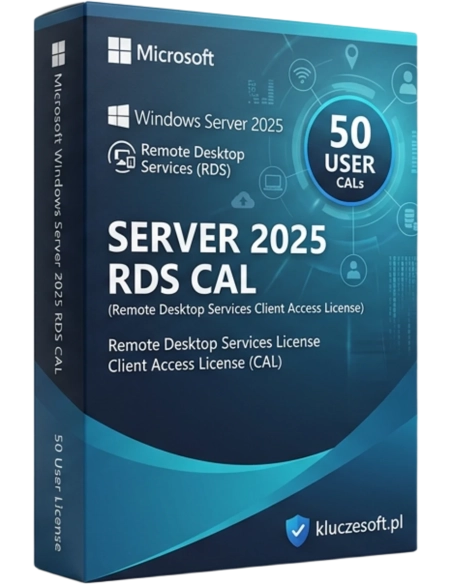



Windows Server 2025 RDS 50 brugere - En avanceret løsning til fjernadgang, der sikrer sikker og effektiv administration for 50 brugere. Ideel til virksomheder, der kræver pålidelige tjenester til fjernskrivebord.
Pakke med 50 Remote Desktop Services-adgangslicenser pr. bruger til Windows Server 2025
 Øjeblikkelig levering ■ Evigvarende licens
  Original Microsoft-licens
RDS User CAL (Remote Desktop Services Client Access License) er en licens, der giver en bestemt bruger ret til at oprette forbindelse til Windows Server 2025 via Remote Desktop Services — altså til fjernarbejde på serverens skrivebord. Hver medarbejder, der tilgår RDS-miljøet (fjernskrivebordssession, RemoteApp, VDI), skal have sin egen RDS CAL-licens, uanset hvor mange enheder der bruges til opkobling. Bemærk: RDS CAL er en separat licens fra den almindelige Windows Server CAL — du har brug for begge.
RDS User CAL giver fuld adgang til Windows Server 2025 fjernskrivebord fra hvor som helst i verden. Medarbejdere kan bruge virksomhedens applikationer, filer og ressourcer, som om de sad på kontoret — fra enhver enhed med en RDP-klient.
Windows Server 2025 er den nyeste version af Microsofts serversystem med forbedret sikkerhed (Hotpatching, SMB over QUIC), bedre identitetsstyring og indbygget integration med Azure Arc. Længst mulig supporthorisont og høj kompatibilitet.
User CAL følger medarbejderen — vedkommende kan oprette forbindelse til RDS-sessionen fra en kontorcomputer, en bærbar derhjemme, en tablet på farten eller endda en telefon. Én licens dækker alle medarbejderens enheder.
RDS gør det muligt at køre applikationer på serveren i stedet for på lokale computere. Opdateringer, backup og softwarestyring samlet ét sted — det reducerer administrationsomkostningerne markant og eliminerer problemet med forældede versioner.
Data forlader aldrig serveren — på brugerens enhed vises kun skrivebordsbilledet. Tab af en bærbar eller tyveri af en enhed betyder ikke datalæk af virksomhedens oplysninger. Ideelt til virksomheder, der behandler følsomme data.
Hver RDS-forbindelse kræver en RDS CAL-licens — Microsoft håndhæver aktivt dette krav. Pakken med 50 RDS User CAL sikrer fuld licensdækning til et mellemstort fjernteam med faktura inkl. moms til brug ved revision.
RDS CAL giver ikke kun ret til klassisk fjernskrivebord, men også til RemoteApp (enkeltstående applikationer vist på det lokale skrivebord) og VDI-scenarier (Virtual Desktop Infrastructure). Én licens — tre adgangsformer.
Licensier tilbyder Windows Server 2025 RDS User CAL til engrospriser, langt under Microsofts listepriser. Som specialister i serverlicenser hjælper vi virksomheder med at forstå den komplekse RDS-licensmodel: hvornår der kræves en RDS CAL, hvornår en standard CAL er nok, og hvordan man vælger mellem User og Device. Hver ordre leveres elektronisk på få minutter med original licens, fuld faktura inkl. moms og professionel support.
| Produkt | Microsoft Windows Server 2025 RDS — 50 User CAL |
| Licenstype | RDS User CAL (Remote Desktop Services, pr. bruger) |
| Antal licenser i pakken | 50 RDS User CAL |
| Windows Server-version | Windows Server 2025 |
| Påkrævet ekstra licens | Windows Server CAL (standard) + serverlicens |
| Tilknytning | Til en bestemt bruger (adgang fra enhver enhed) |
| Licens | Evigvarende (uden udløb) |
| Microsoft-support | Udvidet support indtil oktober 2035 |
| Kompatibilitet | Windows Server 2025 (og ældre RDS-versioner) |
| Sprog | Alle sprogversioner |
| Leveringsform | Elektronisk — licensnøgle via e-mail |
RDS User CAL er knyttet til brugeren — vedkommende kan oprette forbindelse til RDS fra et ubegrænset antal enheder. Ideel til mobile medarbejdere, fjernarbejde og hybride arbejdsformer, hvor én person bruger bærbar computer, tablet og hjemmecomputer. RDS Device CAL er knyttet til enheden — et ubegrænset antal brugere kan anvende den samme enhed til RDS-forbindelser. Bedre til thin clients på kontoret, delte terminaler og undervisningslokaler. Reglen er enkel: Hvis medarbejdere forbinder fra mange enheder, vælg User CAL. Hvis mange personer bruger de samme terminaler, vælg Device CAL.
Ekspres elektronisk leveringDu modtager din licensnøgle på e-mail inden for få minutter efter bestillingen
Nej. Det er to separate licenser. Windows Server CAL giver adgang til serverens grundlæggende tjenester (filer, print, Active Directory). RDS CAL er en ekstra licens, der specifikt kræves for at bruge Remote Desktop Services. Du har brug for begge — standard CAL og RDS CAL — til hver bruger, der forbinder via RDS.
Der er ingen grænse. En bruger med tildelt RDS User CAL kan oprette forbindelse til Remote Desktop-sessionen fra et ubegrænset antal enheder — kontorcomputer, bærbar derhjemme, tablet på farten eller telefon. Én licens dækker det hele.
Ja, hver bruger eller enhed, der forbinder til Windows Server via Remote Desktop Services (fjernskrivebordssession, RemoteApp, VDI), skal have en RDS CAL. Den eneste undtagelse er op til 2 samtidige administrative forbindelser, hvor RDS CAL ikke er nødvendig — men det gælder kun administratorer, der administrerer serveren, ikke slutbrugere.
Ja, RDS CAL-licenser er bagudkompatible. RDS User CAL 2025 giver adgang til RDS på Windows Server 2025, 2022, 2019 og ældre versioner. Ved at købe 2025-versionen er du sikret fremadrettet.
Ja, fuld RDS-licensering kræver tre elementer: (1) Windows Server 2025-licens, (2) standard Windows Server CAL til hver bruger/enhed, (3) RDS CAL til hver bruger/enhed, der benytter Remote Desktop Services. Alle tre kan købes hos Licensier.
I Per User-tilstand tildeler RDS-licensserveren automatisk en midlertidig CAL ved brugerens første forbindelse. Efter cirka 60-90 dage bliver den midlertidige CAL permanent. Licensserveren håndterer tildelingerne automatisk — du behøver ikke at tildele hver licens manuelt.
Ja, efter 90 dage fra sidste tildeling eller straks, hvis medarbejderen forlader virksomheden. I praksis håndterer licensserveren dette automatisk — ubrugte CAL-licenser frigives efter en periode med inaktivitet.
Ja, RDS User CAL-licenser til Windows Server 2025 er evigvarende. Efter et engangskøb er der ingen abonnementsgebyrer, løbende omkostninger eller fornyelser. Brugsretten udløber ikke.
Ja, der udstedes en fuld faktura inkl. moms til hver bestilling. Den er tilgængelig i kundepanelet og sendes også via e-mail. Fakturaen dokumenterer det lovlige køb af licensen til brug ved revision og regnskab.
Antallet af samtidige RDS-sessioner er ikke begrænset af CAL-licensen, men af serverens ressourcer (RAM, CPU) og systemkonfigurationen. Hver bruger med en gyldig RDS CAL kan åbne en session. I praksis er 50 samtidige kontorsessioner fuldt realistisk på en korrekt konfigureret server.

Produktinformation
Windows Server 2025 RDS 50 brugere - En avanceret løsning til fjernadgang, der sikrer sikker og effektiv administration for 50 brugere. Ideel til virksomheder, der kræver pålidelige tjenester til fjernskrivebord.